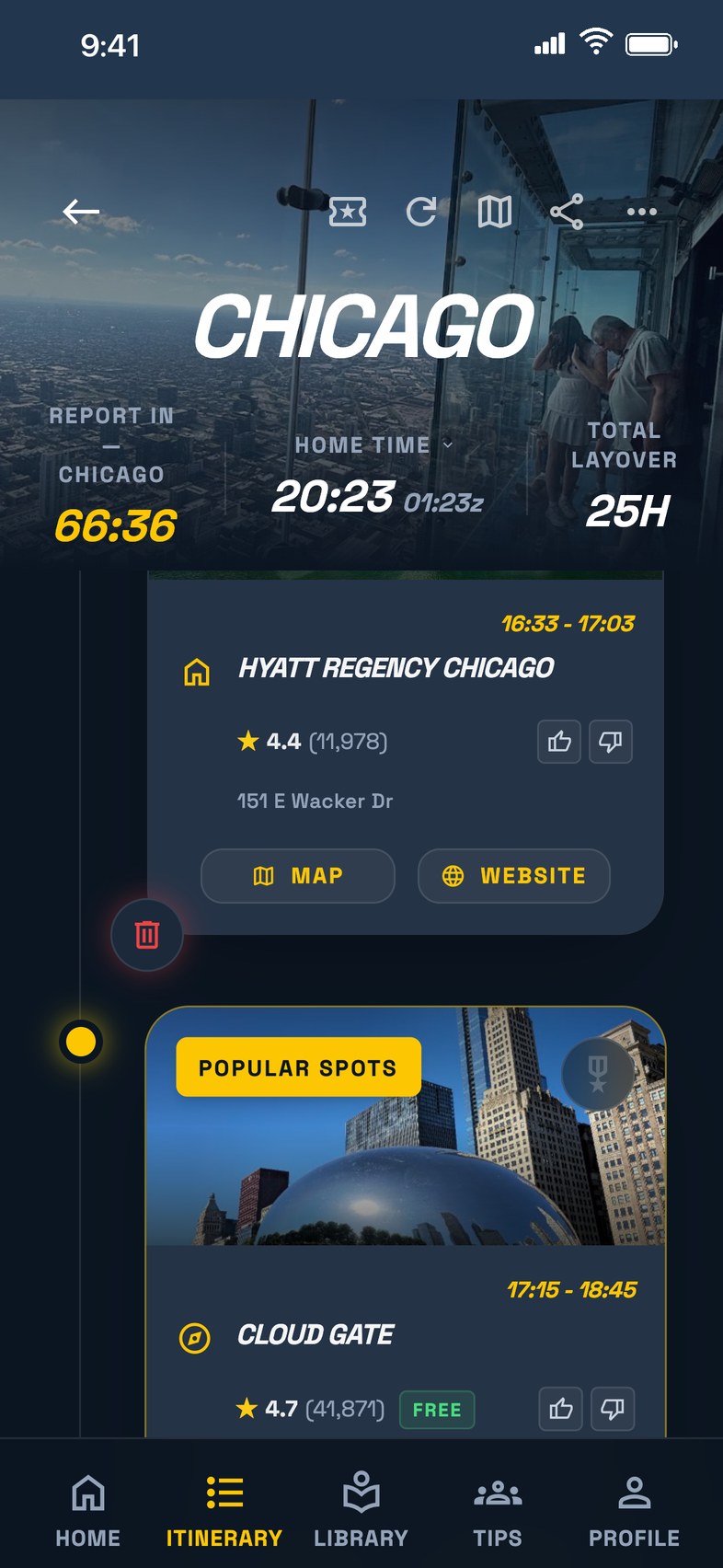
Layoverly itinerary for a Chicago layover
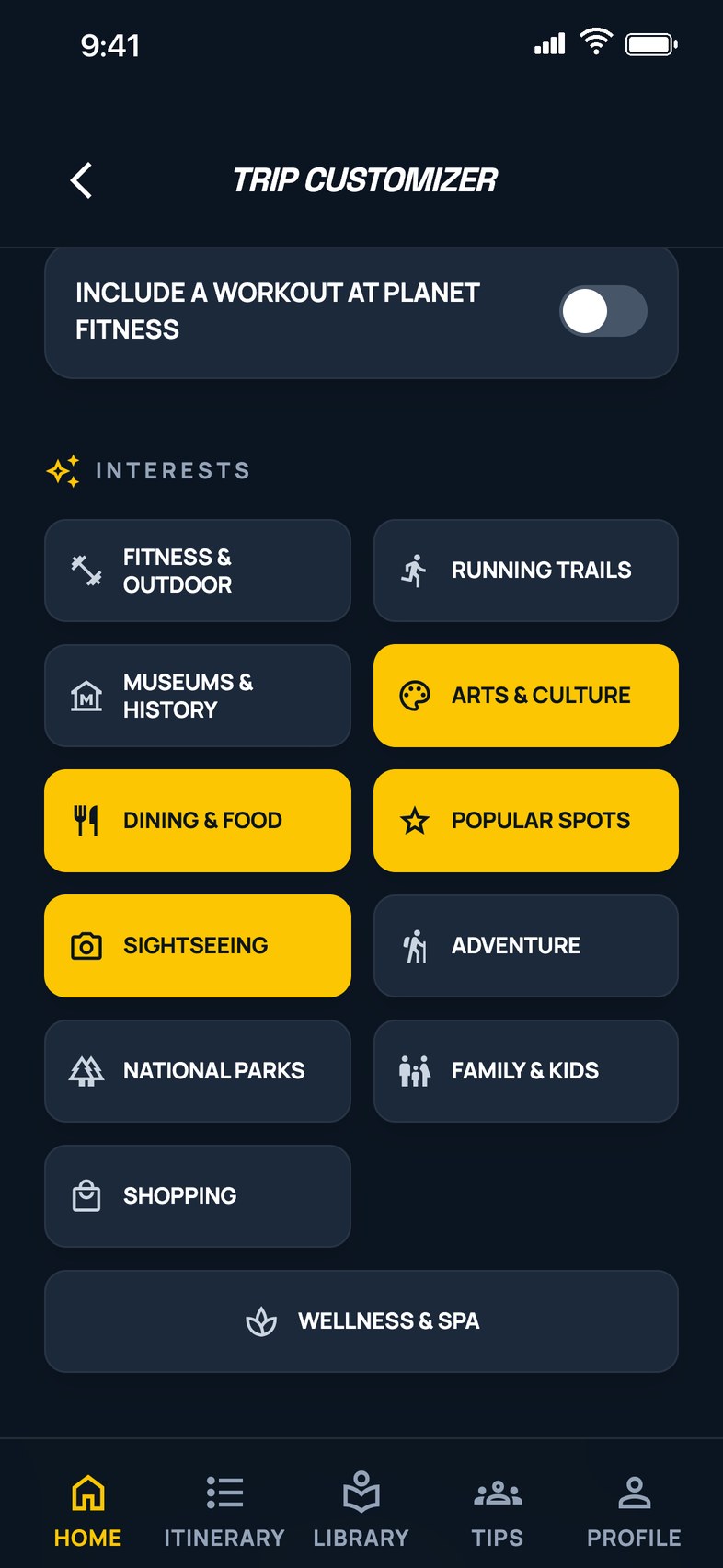
Layoverly trip customizer
Now Available on iOS + Android

Built for Flight Crews. Smarter Layovers.

Custom layover itineraries, live flight alerts, and your crew — all in one app. Now available on iOS and Android.

Got a promo or referral code?
Scroll to see more

Custom Layover Itineraries

Stop wasting your layover in the hotel.

Get out and explore. Layoverly builds a custom itinerary around your exact time on the ground — your report time, your hotel, your interests, and how far you feel like walking. Every stop is checked against the venue's real opening hours for the day you'll be there, and anything closed is swapped for a comparable spot nearby.

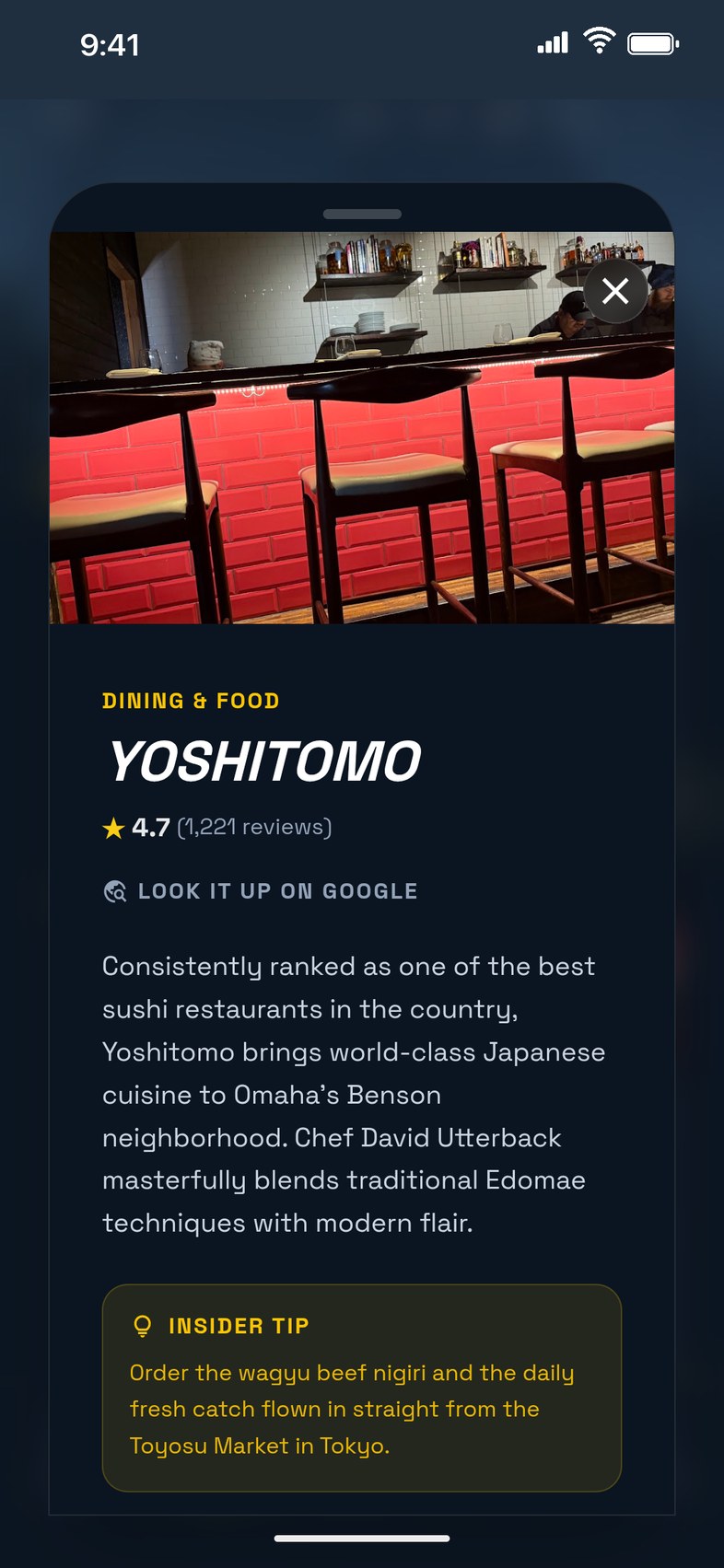
Layoverly venue card with rating, description and insider tip

Trip Watch

Your flight, watched for you.

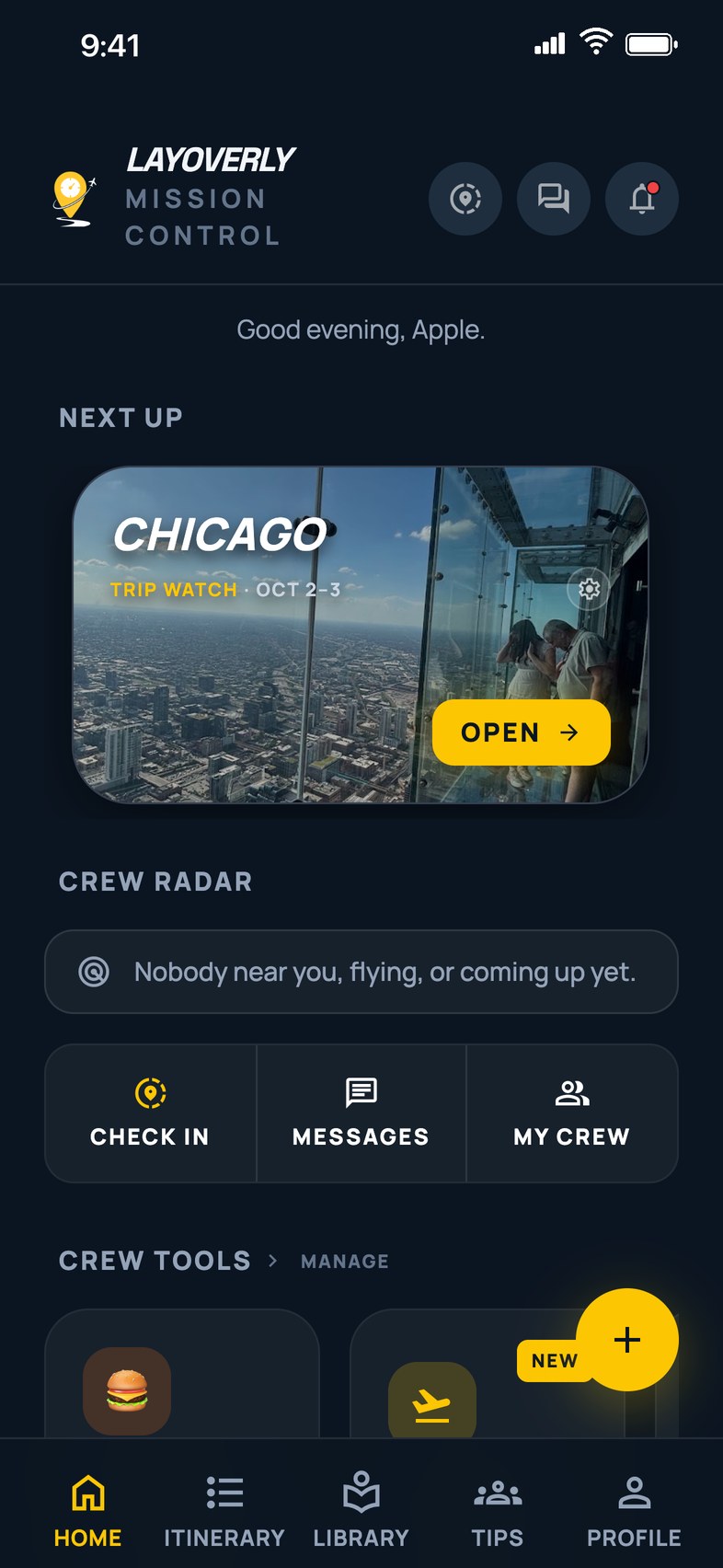
Gate change, terminal change, delay, cancellation, diversion, wheels up, wheels down — pushed to you the moment it happens. A live flight card on your iPhone Lock Screen and in the Dynamic Island, a home-screen widget, and one clean timeline of your whole day from report time to the hotel van.

Layoverly Home screen with the next layover and Trip Watch

Schedule Import

Import your schedule in seconds.

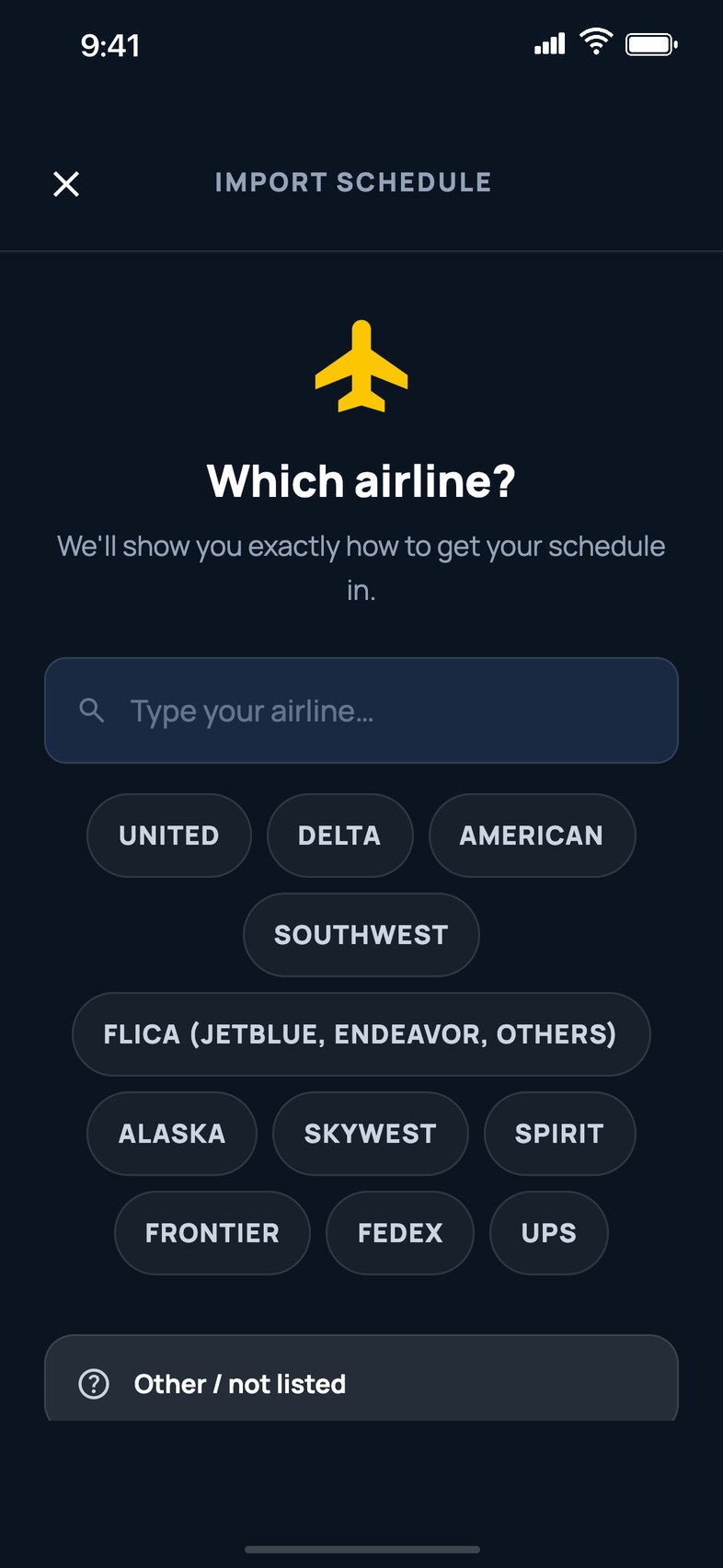
Works with any airline. Connect the phone calendar you already subscribe your schedule to, snap a screenshot of your rotation, or just type your flight numbers — Layoverly turns every layover into a trip. Business Class keeps it in sync automatically and tells you when something changes.

Layoverly schedule import, pick your airline

Crew Radar & Crew Chat

Find your crew on layover.

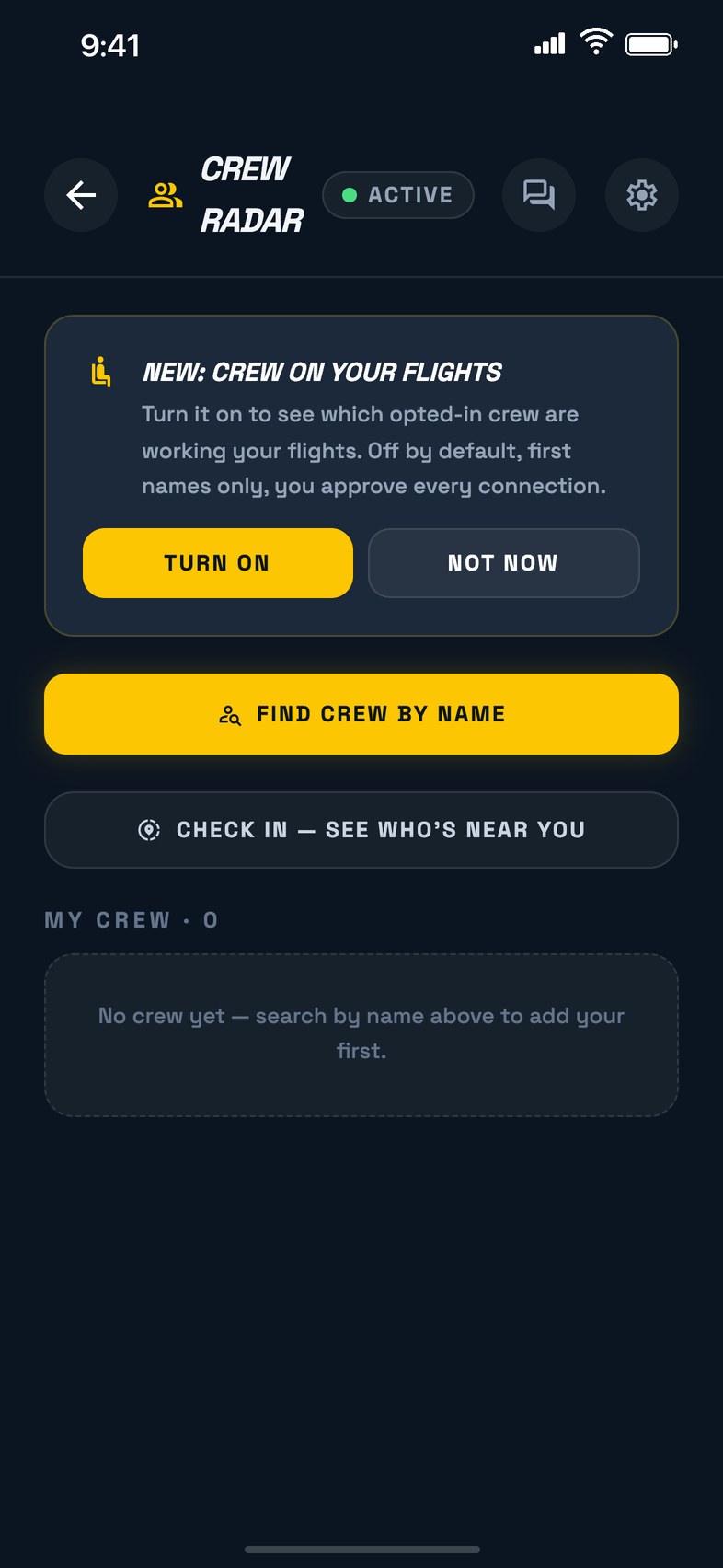
See who's in your city tonight, who's in the air, and who's coming up. Message them without ever sharing a phone number, open a Layover Lounge for the night, and find friends by name. Crew on your flights is opt-in and always your call.

Layoverly Crew Radar

Follow My Trip

One link for the people at home.

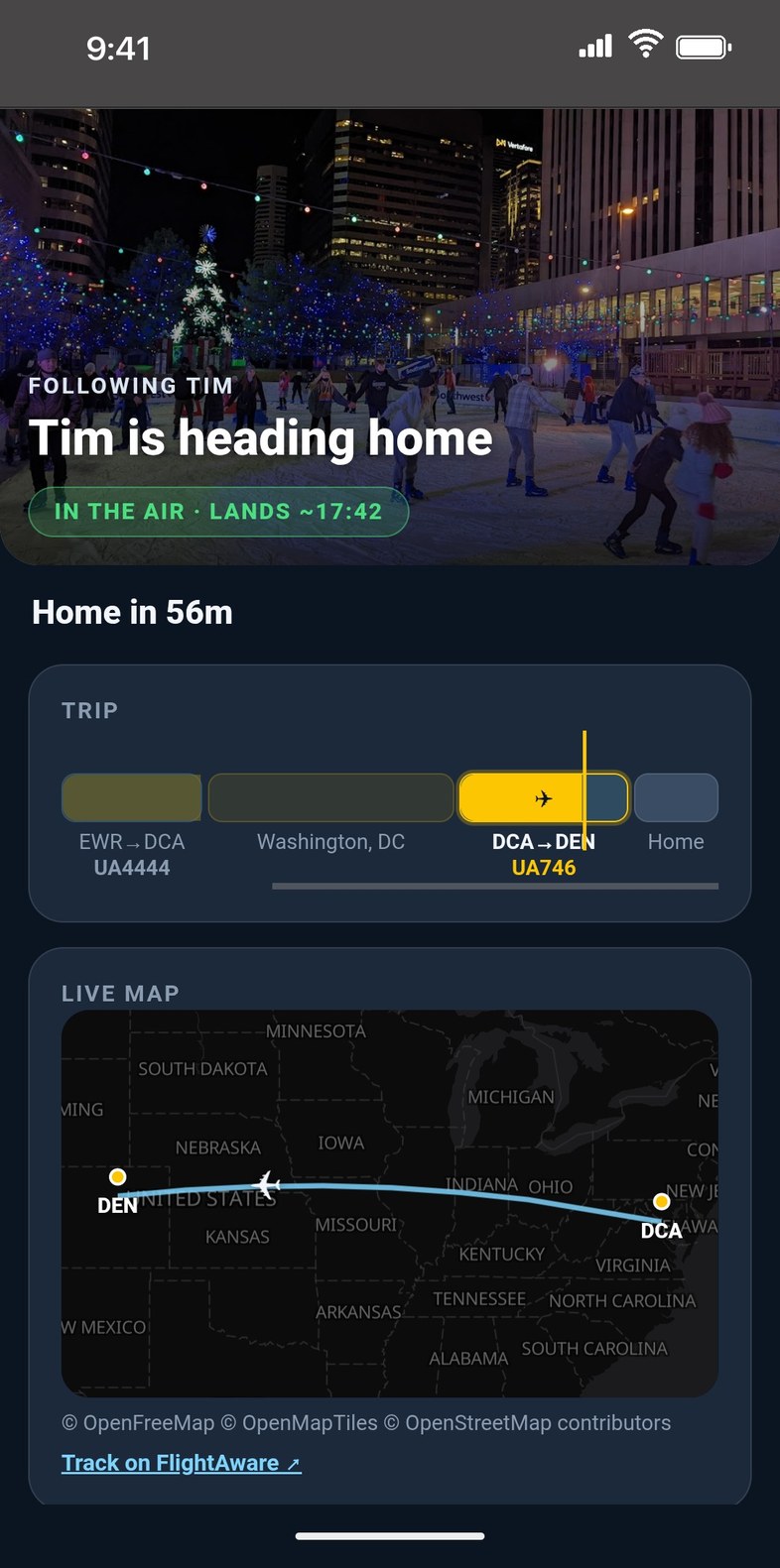
Share it once and it always shows your current trip. Family sees your city, today's flights, live status, a map of your plane in the air and a "home by" time in any browser — no app needed — and they can turn on takeoff and landing alerts. Your hotel address is never shared. Free on every plan.

Follow My Trip page showing a crew member heading home with live flight status and map
🧰

Crew Tools

Crew Breaks that work in airplane mode, a Per Diem tracker that earns while you sleep, offline currency rates, a Commuter flight finder, Food Radar for what's open right now, and a Crew Passport that logs your flights, block hours and cities.

💡

Crew Tips & Discounts

The best coffee, the hidden-gem restaurants, the shuttle-pickup rules and the spots that honor crew ID — posted by fellow flight attendants and pilots, sorted by the city you're in.

Release Notes

What's New

v3.1.2

October 2026
  • 🛂

    Crew Passport, rebuilt. A map of everywhere you've flown, miles flown (and how many laps of the earth that is), passport-style city stamps, highlights like your longest flight and busiest month, and a share card with your year on it. Now in Crew Tools.

  • 📓

    Send to LogTen (First Class). Send a flown trip straight into your LogTen logbook, or save a CSV for any logbook. Every flight shows where its times came from, you can check them against live flight data for actual out and in times, deadheads are marked and left out unless you include them, nothing goes without your tick, and if you already keep a LogTen logbook it asks when to start so old trips aren't sent twice. Profile → Sent to LogTen keeps the record and lets you re-send or remove.

  • 🛋️

    Reserve days. Reserve blocks from your schedule now show on My Schedule, on the Home ribbon, and in Crew Radar, so friends on layover in your base can find you while you're on reserve. Turn it off under Crew Radar settings.

  • 📅

    Import says what it found. After a sync you'll see what's upcoming, what's already flown and saved to your Passport, and any reserve days, instead of a blank Home when nothing is coming up. The Southwest guide now covers the CrewHub calendar export, and import looks back 30 days.

  • 🧰

    Smaller fixes: red-eye flights keep their next-day arrival, the Follow Layoverly card waits until the new-user checklist is done, and a flight-number count that was wildly off from a bad stored date is caught and flagged.

v3.1.1

October 2026
  • ❤️

    Follow Layoverly, get free stuff. Follow on Instagram (@layoverly_app) or TikTok (@timrayc130), then claim at layoverly.com/follow: free Business Class days, bonus itineraries if you already subscribe, and a monthly handle-wrap drawing.

  • 🔔

    Notifications, rebuilt. Grouped by day with times, and tapping one opens the trip, alert, sync or conversation it's about. Trip Watch alerts and crew requests land in the bell too. Mark all read in one tap.

  • 🔴

    The red badge on the iPhone app icon clears when you open the app.

  • 🔎

    Text size, your way. Profile → Text Size follows your phone's setting, or pick Large, Larger or Largest.

  • 📅

    Re-sync tells you what happened, including when Calendar access is off for Layoverly.

  • 🛩️

    Crew Radar: "At the airport" only in the last 90 minutes before a friend's departure, and times now name their airport ("departs 14:32 STL").

  • ⚡

    Generate opens your itinerary right away.

  • 🧰

    Smaller fixes: Corporate / Charter / Other airline choices, the FLICA guide for Republic, WestJet and Jazz, a "Not built yet" screen for an unbuilt import, sign-up stays on the plans screen, and the Waypoints button counts your events.

v3.0.9

October 2026
  • 🔒

    Your family link, your rules. Reset link makes a brand-new Follow My Trip link and shuts off the old one for everyone who had it — forwarded screenshots included. A new "Show my hotel name" switch hides the hotel from the family page and widget while family still sees your city and flight times.

  • ✈️

    Pick your leg. When a flight number flies several legs in a row (ORD → ANC → HKG), the app shows every leg with its date and lets you choose yours, instead of silently taking the first one that matched your date.

  • 📦

    Cargo and regional flights tracked for real. Kalitta, FedEx, UPS, Atlas, Polar, ABX and most regionals file under a different airline code than the one you type, and live tracking was coming back empty for them. Trip Watch status, alerts, the Home card and the family page now find those flights.

  • 📂

    FLICA exports import. FLICA's Export Schedule saves a .vcs file, and the upload button only let you pick .ics files — so the file sat greyed out. Both can now be chosen and read.

  • 🛬

    Flight In / Flight Out, explained. Regional crews fly four or more legs a day and read the two-flight form as a limit. It now says what it means: the leg that lands you at your layover and the first leg of your next duty day.

v3.0.8

October 2026
  • 🕐

    Every time on its own airport's clock, ahead of the Nov 1 clock change. Flight times across Layoverly are read on the airport's clock, never your phone's: the widgets follow the right flight on overnight legs, the in-flight progress bar is right on cross-country flights, Trip Watch picks up a flight imported the same morning, layovers that span the clock change import correctly, and every landing, departure and report time now names its airport ("Landed 09:32 BOS"). Trips you typed in or scanned from a screenshot now show on the widget and in Trip Watch too.

  • 📅

    Calendar times that arrive in a different zone — a feed written in UTC, or an event stored in your home zone with no times in its text — are now converted onto the arrival and departure airports' clocks before a trip is created.

  • 🌤️

    Weather days are the destination's days, not UTC's — the midday reading is actually midday there, and the weekday labels on the forecast match.

  • ⏱️

    The Live Activity shows your landing time next to the departure, each labelled with its airport.

  • 🛩️

    Crew Radar's "Flying today" means today. A friend whose next flight was days away could show as "At the airport" with a departure time and no date. Now "At the airport" means their next leg leaves within six hours, "Flying today" means today, and a friend flying tomorrow says "Flying tomorrow · departs 06:10." Friends on a layover now show too, as a purple pin and an "On layover" row under the flying list, with the city and the flight that ends it. Days off at home base stay private.

  • 🎟️

    Event Explorer works for trips synced from your calendar. Concerts and games during your layover now load for synced trips too, using your hotel's location when the trip has no city on record yet.

  • 🍁

    Air Canada import guide corrected. The earlier steps described a different vendor's system and didn't match what AC crew actually see, so the guide now says plainly that no calendar export is known yet and points you to screenshot import, which works today. We'll add the real steps once an AC crew member confirms the export path.

v3.0.7

October 2026
  • 🎁

    Your first layover plan is on us. Import your schedule and we build one plan for your next layover with a hotel, so you can see what Layoverly does before you build anything yourself. After that one, every plan is yours to build: tap any layover and choose what you're in the mood for. We tell you when it's being built — on the import page, on Home, and in the new getting-started checklist.

  • ✅

    A getting-started checklist on Home. Four steps — import your schedule, build your first plan, turn on alerts, share your trips with family — each one tap away, and it folds up once you've done them.

  • 🗺️

    Ride there, then walk. With Taxi/Ride or transit selected, a plan now takes you to one good neighborhood and keeps every stop within your walking radius of it — one ride out, one back — instead of criss-crossing the city between famous spots. The marquee attraction becomes the center of that outing. Walk-only plans are unchanged.

  • ⚡

    Schedule sync in about 25 seconds, down from a minute and a half. The app now sends only the events that look like flights, and the server reads them faster. Nothing about what gets found changed — checked flight by flight against real crew calendars.

  • 🔔

    Alerts offered when they matter. Right after your schedule imports, one card explains why Trip Watch and Crew Radar want notifications and lets you turn them on. If alerts are off for a flight you're watching, Home says so with a one-tap fix. Never more than one such prompt per app open.

  • 👨‍👩‍👧

    Share a family link from more places — the import success page and the Trip Watch header, not only inside a built itinerary. And the share sheet now opens on the first tap, even when creating the link takes a few seconds.

  • 📍

    The blue hotel pin is back on every map, with the walking circle around it, and after "See Plans" the Back arrow returns you to the Schedule Synced page instead of the start of the wizard. That page also scrolls properly now.

  • 💬

    Smaller things: a "Want a plan for it?" nudge for your next unplanned layover (at most once per app open, and it stays quiet for a week if you dismiss it); a count of crew from your airline based at your airport on Crew Radar; trial reminders at 4 days and 1 day that say exactly what changes.

v3.0.6

October 2026
  • ✈️

    Flight Numbers is back on the + menu. Don't sync a calendar? Tap +, choose Flight Numbers, type your flights, and we'll pull the times, cities and hotel and build one layover — exactly as before the import wizard arrived. It's also offered on the wizard's "we found events" screen, on the no-flights screen, and whenever a screenshot can't be read.

  • 🛫

    The whole flight, not half of it. When you look up a flight number, the card now shows both ends like your pairing does — DEN 22:15 → AUS 05:46, each in its own airport's local time, with a +1 when it lands the next day — and marks which end your layover starts or ends on. The old card showed only the landing time, under a label that read like the flight had already happened.

  • 📍

    The Itinerary tab opens the layover you're on. It used to sit on "No Active Mission" until you opened a trip from Home or the Library. Now it opens the trip you're in the middle of, or the next one coming up — the same one Home's Next Up leads with.

  • ◀️

    Android Back behaves. Back now closes whatever is open first — the + menu, a share sheet, a pop-up, a wizard step — instead of leaving the screen or minimizing the app with the sheet still open. It follows the same path as the on-screen arrow everywhere, and from Itinerary, Library, Tips or Profile it goes Home first; from Home it minimizes.

v3.0.5

October 2026
  • 📲

    iPhone alerts, fixed at the root. If you signed in with email or Apple on an iPhone, Layoverly was never registering your phone for alerts even after you allowed notifications. It does now, on the first launch after this update, and a one-time note at Home tells you so. No settings to touch.

  • 🔔

    Never asked? Now you are. If your phone was never shown the notifications question, the app asks once at Home and explains why: Trip Watch needs alerts, and Crew Radar is far better with them. We never send marketing pushes.

  • ✈️

    Trip Watch tells you the real reason. "Watch another flight" used to say Trip Watch wasn't available on your account when the actual problem was notifications. It now says exactly what's needed, and asks for notification permission right there if that's the missing piece.

v3.0.4

October 2026
  • 🗺️

    Crew Radar, now a real radar. Tap Radar on Home (where My Crew used to be) for a map with a pin for every crew friend: green for near you now, gold for coming up, blue for flying today. Tap a pin for who they are, what they're doing, and a Message button. The same three groups are listed under the map, with a chat button on every row.

  • 🧭

    Same controls on every crew screen. Check In, Messages and My Crew sit in the same bar at the top of the Radar screen and the My Crew list, matching Home, so nothing moves around on you.

  • 👥

    People you can actually meet come first. Near you now, then Coming up, then Flying today. Coming-up rows now say where and when: "Lands DEN 14:14 · Denver International Airport · today 14:14–15:01."

  • ⏰

    Right on time. Crew Radar could say a friend was near you hours before they landed, because some trip times were read in the wrong time zone. Fixed, and every upcoming trip was re-checked. Overnight flights now land on the right day, and a flight number that flies two legs in one day keeps both. Trip Watch and Follow My Trip get the same corrections.

  • 📨

    Your sent requests are back. Crew Radar shows "N sent, waiting" whenever you have connection requests nobody has answered yet, so you can find and manage them even when there's nothing waiting for you.

  • 👆

    Tappable everywhere. The "On the radar" card on Home responds to a tap anywhere on a row, not just on the name, and every line shows in full instead of cutting off. Long place names wrap on crew rows too.

  • 🔔

    One landing, one alert. If you'd ever tried Family Mode on your own phone, you were getting both the crew alert and the family-worded one for the same event. Your own phone is now left off the family list.

  • 🍁

    Air Canada joins the import wizard, with steps for getting your schedule in. Asked for by an AC crew member in Montréal.

v3.0.3

October 2026
  • 😴

    Downtime that sticks. Set your downtime hours once and they stay with the trip — through rebuilds, reopening from the Library, and app restarts. Make it any window you like: a couple of hours later, or the middle of the local day if you're staying on home time abroad. Nothing gets planned inside it, and a late-night check-in means the day ends at check-in, no bar afterwards. If anything ever does land inside your window, the card is flagged in red so you can swap or delete it.

  • 🌙

    Honest nights. In a smaller city where nothing's open during your awake hours, the plan now gives you a clear Free Time block instead of a stop that's closed.

  • 👨‍👩‍👧

    Family Mode tidy-ups. Once alerts are on, the big alerts card shrinks to a one-line strip so the trip page gets the space. And there's now a plain "Leave Family Mode and sign in" link for crew who tried a family code on their own phone.

  • 🗓️

    No more phantom sync banner. The automatic calendar check that runs when you open the app no longer leaves a "Still reading your calendar…" banner on Home. You'll only see that banner for a sync you started yourself and left mid-way.

  • 📬

    Also: support requests and sign-up alerts sent from the app now actually reach us. If you wrote in from the Calendar sync or Add my airline forms before and never heard back, we're sorry — we have them now. And the little loading circle in venue and crew search fields spins again instead of bobbing up and down.

v3.0.2

September 2026
  • 🛫

    Crew on your flights (opt-in). Turn it on in Crew Radar settings to see which opted-in crew are working your flights, first names only, and connect with a tap. Off by default, always your call.

  • 👨‍👩‍👧

    Follow My Trip, rebuilt. Family's page now shows a destination photo, a whole-trip ribbon with every flight number, a live route map once your plane's in the air, today's legs, and a "home by" time — plus a line saying when it was last synced, so they know how fresh it is. Free on every plan, and the same page now lives inside the app too.

  • 🔔

    Family Mode, no account needed. Family taps Family Mode on the sign-in screen, enters your code from the Follow page, and hits Turn on alerts to get a push when you take off and when you land.

  • 🧭

    A schedule wizard that looks first. Import my schedule now checks your phone's calendar before asking you to do anything else. Nothing there? It walks you straight to the right next step for your airline — a live link for United, a one-time export for FLICA, an honest "no export yet" card for the rest — or a screenshot/PDF, an .ics file or link, or just typing your flight numbers. Can't find your airline? Tell us and we'll add it.

  • 💳

    Plans, made clearer. Schedule import is now free on every plan. Business Class syncs your schedule automatically and alerts you to changes. First Class stays unlimited, plus every power tool. Yearly billing is pre-selected with clear per-month pricing, and every plan sits side by side so it's easy to compare. Every new account starts with 14 days of Business Class on us — no card needed. Invite a friend: they get 30 days of Business Class, and you earn a bonus itinerary when they join with your link.

  • ✈️

    Trip Watch: your Lock Screen Live Activity now reaches every iPhone you're signed into, and the widget speaks up once your inbound aircraft has actually landed.

  • 🐛

    Also: photo and file picks were vanishing on iPhone in Smart Scan and the support form — fixed. A slow tap on Generate Guide could quietly build the same trip twice; a real building lock and an instant "Building your guide" screen stop that now. Calendar sync tells you plainly when it finds nothing, instead of a confusing popup. United CCS+ schedules with long descriptions and hotel names read correctly, and overnight arrivals land on the right date. The "out of itineraries" notice has its own See plans button, and a one-time banner lets you know if your trial has ended.

v3.0.1

September 2026
  • 🗺️

    Where am I? A new ribbon at the top of Home shows yesterday, today and tomorrow in one line: your cities, every flight between them, and a "you are here" marker on whatever you're doing right now. Tap it to open Trip Watch.

  • 🔔

    Fewer, better alerts. One push per update instead of three: "Wheels up 06:33 ORD · landing ~09:31 BOS · arrival gate B25" is a single notification now. And it never doubles up.

  • 🎚️

    Pick your alert level. Essentials (gate, delays, cancellations, diversions, takeoff, landing) is the default. Want arrival gates and bag carousels too? Switch to Everything in Crew Radar settings.

  • 🕒

    Every time now says where. "Landed 09:32 BOS." No more guessing whose clock you're looking at.

  • 📱

    Widgets keep up on their own. When one leg lands, the widget moves to the next one — even if you haven't opened the app since yesterday. Both widgets read the same data, so they always agree.

  • ⏱️

    Crew Breaks the way crews think: enter OFF and estimated ON and we do the math. Prefilled from your schedule, no signal needed, so it works in airplane mode.

  • 🧭

    Crew Radar shows "In the air" only when someone is actually airborne, and times are correct for trips that came in by Smart Scan.

  • 🐛

    Also: the Crew Tips reminder no longer suggests tipping your hotel van, tapping it opens the right screen, and calendar sync stops making a second copy of a trip you already built.

v3.0.0

September 2026
  • ✈️

    Trip Watch is here. Your flight, watched for you. Gate change, terminal change, delay, cancellation, diversion, wheels up, wheels down: you get a push the moment it happens. Tap the gear on your trip card and it's all there. Included with Business and First Class.

  • 🗓️

    Your whole day, at a glance. Report time, van, boarding, every leg, the van to the hotel. One clean timeline, with a countdown to report right on your trip card. And when we know which aircraft is flying your leg, we tell you where it is and when it lands.

  • 🔒

    Never unlock your phone at the gate again. Live flight card on your iPhone Lock Screen and in the Dynamic Island. A quiet flight-day notification on Android. Plus a brand-new Trip Watch widget for your home screen.

  • 👨‍👩‍👧

    Family can follow along. Your Follow My Trip link now shows every leg you're flying today, live status, and the same delay outlook you see, so the people waiting for you know exactly when to expect you. They can even put your flight on their own widget.

  • 📊

    A delay outlook that's just the facts. One plain line: how late your inbound aircraft is running, how the airport's doing today, and this flight's on-time record. No guessing, no hype.

  • 📡

    Crew Radar, front and centre. Right on Home: who's in your city tonight, which of your crew are in the air, and who's coming up. One tap opens their chat. And when you land, Crew Radar marks you there on its own. Sitting at an airport between flights? That counts too, so a crewmate on the same connection just shows up.

  • 🔍

    Find your crew by name. Type a name, see their airline and base, send a request. No crew code to swap, and nothing is shared until they accept. Don't want to be found? One switch in Crew Radar settings and you're invisible to search.

  • 📖

    Your flight log, in your Crew Passport. Flights, block hours, airports, cities, your longest duty day and your most-flown route. This month, this year, all time.

  • 🏠

    Home puts now first. Inside 48 hours of a trip, what's happening now sits at the top and the to-do list gets out of the way. Same on every phone you're signed into.

  • 🐛

    Under the hood. Notifications now reach every iPhone that allowed them, trip photos repair themselves, widgets track the trip you're actually on, and calendar sync answers in a second when nothing changed. Plus a stack of fixes you'll never notice, which is the point.

v2.4.2

September 2026
  • 🧠

    A smarter guide: every stop is now double-checked against the venue's real opening hours for the day and time you'll be there. Anything closed is swapped for a comparable spot nearby, and the day stays clustered so you're not zig-zagging across town.

  • 🚶

    Walkable really means walkable: pick Walkable only and every stop stays inside your chosen walking radius. Add transit or a ride and the guide knows it can venture further — including to where your interests are when your hotel sits out by the airport.

  • ⏱️

    Better timing on both ends: hotel check-in and your Grab Bags & Transit card are now set from real drive times for that day and hour, so an airport hotel and a downtown hotel each get the right buffers.

  • ✏️

    Editing a saved trip works the way you'd expect: Trip Settings now shows exactly what the trip was built with, and every change you make — mobility, walking radius, cuisine, arrival nap — actually applies when you rebuild.

  • 📷

    Faster, truer cards: photos and details load quicker and always match the venue, and any stop that gets swapped receives a real write-up about the new place.

  • 🐛

    Reliability: a build can no longer spin forever. A stalled or failed build shows a clear Try Again in both the itinerary and your Library, and a failed build never counts against your monthly total.

  • 📱

    Bigger screens, done right: on iPad and on unfolded foldables like the Pixel Fold, Layoverly now fills the display instead of showing a phone-sized window in the middle of the screen.

  • 🎁

    Share Layoverly with a QR code: tap Share Layoverly on Home (or QR Code under Profile → Share & Earn) and hand over your phone. Crew scan it with their camera, sign in once, and their 30-day Business Class trial (everyone else gets 14) is waiting when they install the app — nothing to type. The usual text / AirDrop share and Copy Link are right there too. Friends can also just type your referral code into the code box above.

v2.4.1

September 2026
  • 🏨

    The right hotel, every time: Calendar Sync and Smart Scan now pin your layover hotel to the exact property using every clue your schedule gives (name, phone number, address), and the itinerary's hotel card, map and website buttons use that verified location. Fixes chains with several hotels in one city — the Downtown branch no longer turns into the Times Square one.

  • 🐛

    Squashed: Calendar Sync could spin forever after you locked your phone or left the screen, even though the sync had finished. It now keeps checking in the background, picks up a finished sync when you come back, and tells you clearly if something went wrong instead of spinning.

v2.4.0

September 2026
  • 📅

    Calendar Sync now reads your phone's Calendar app: on iPhone and Android, tap Connect your Calendar and Layoverly pulls your trips straight from the calendar you already subscribe your airline schedule to — works with any airline, no crew-portal login needed. We only read; we never edit or delete anything in your calendar. (First Class)

  • ✅

    Review before anything saves: after a sync, every trip we found shows up on a review screen where you can accept, skip, or fix each one individually before it lands in your Library.

  • 🏠

    Home Base on your profile: set your base under Profile → Edit Profile (with a much smarter airport search). Calendar Sync uses it to tell real layovers apart from nights at home — a big help for commuters or if you've transferred bases mid-schedule.

  • 🗑️

    Recently Deleted: deleting a trip from your Library no longer erases it for good. Trips move to Recently Deleted, where you can bring them back anytime — handy when a trade or pickup falls through.

  • 🧠

    Crew Resources adds The Aviation Mindset: self-guided mental-performance resources from Dr. Abigail Powell, The Aviation Therapist, built specifically for aviation professionals. Mindset Tip cards now alternate with Fit4Flight Recovery Tips on your itinerary — each partner has its own on/off toggle.

  • 🎟️

    Event Explorer is now free for everyone: concerts, games and shows in your layover city, on every plan.

  • 💪

    Fit4Flight members: 20% off your first year of Business or First Class (annual). Details at layoverly.com/fit4flight.

  • 🔒

    Subscription status now checks in with the app store every time you open the app, so a restored or changed plan shows up right away. It also recognizes purchases made on early versions of the app, so a plan bought back in May or June can't show up wrong — and a free trial that ended is correctly closed out.

  • 📊

    Helping us fix the rough spots: the app now keeps a simple note of which main screens a brand-new account visits in its first session, and how often each main screen gets used. Screen names only — never what you type, your trips, or your messages — so we can see where new crew get stuck and smooth it out.

  • 💬

    Crew Chat gets reactions & replies: tap and hold any message to react with an emoji, or reply directly to a specific message with a quoted preview — in both Crew Chat and Crew Lounges.

  • 🔔

    Smarter notifications: tapping a chat or lounge notification now takes you straight into that conversation, instead of just landing on your Messages list.

  • ✕

    Small polish: text fields across the app now show a quick clear button once you start typing.

  • 🐛

    Squashed: a small number of subscribers could see their plan incorrectly show as a lower tier than what they paid for.

  • 🐛

    Squashed: the itinerary's quality check could occasionally replace a stop with one miles outside your cluster, turning a tight one-ride day into several long rides. Replacements now have to stay in the same neighborhood as the stop they replace, and legit visitor centers and trailheads are no longer flagged as fringe.

  • 🐛

    Squashed: the walking distance shown on a card could be wildly wrong (think hundreds of miles) when a stop had no photo. Distances now come from the stop's verified location.

v2.3.1

August 2026
  • 🗺️

    Choose your maps app: pick Google Maps or Apple Maps under Profile → Edit Profile (Apple Maps only shows up on iPhone/iPad/Mac). Every Map and Directions button in the app now opens your pick.

  • 📸

    Multi-screenshot schedule import: rotation doesn't fit in one screenshot? Add as many as you need in Schedule Importer — Smart Scan stitches them into one continuous schedule.

  • 📅

    Commuter Assistant results are now grouped by day, so a multi-day flight search is easier to scan.

  • 🐛

    Squashed: the Crew Breaks tutorial pop-up could land off the bottom of the screen with no way to dismiss it. Every tutorial pop-up now also has a permanent ✕ close button as a backup, no matter what.

v2.3 — Crew Resources

August 2026
  • 🩺

    New Crew Resources tool: a curated list of outside resources built for crew, right on your Home screen's Crew Tools. First up: Fit4Flight Coaching — fitness, recovery & jet lag coaching built around layover life, plus two free guides.

  • 💡

    Recovery Tip cards: a rotating tip from Fit4Flight's guides now shows on Day 1 of your itinerary. Not for you? Turn them off from the card itself or in Crew Resources.

  • 🛠️

    Manage your Crew Tools: hide or show individual tool tiles on the Home carousel to keep it focused on what you actually use.

v2.2.1 – v2.2.4

July–August 2026
  • 🔗

    Smarter links: tapping a Layoverly link (from an email, a share, etc.) now opens the exact right screen inside the app directly — no more landing on a webpage first.

  • 💬

    Post-trip feedback: a quick, optional thumbs up/down (with a one-line comment on thumbs-down) after your itinerary finishes building.

  • 🍏

    Sign in with Apple keeps your name now — no more retyping it right after signing up.

  • 🐛

    Squashed: assorted App Store compliance fixes, including a working support page.

v2.2 — Follow My Trip 2.0

July 2026
  • 🏡

    One link, forever: Follow My Trip is now a single permanent link. Share it with family once — it always shows your current trip, your next trip, or a friendly "no trips planned" page.

  • 🛫

    Live flight status front and center: when your flight has real-time data, the headline shows it — delays, gates, and estimated landing. Tap the flight number to watch your plane on a live map.

  • ✅

    Landed check-in: confirm the "you've landed" prompt and your follow page shows "✓ checked in from [city]" — one tap, and everyone at home can breathe easy.

  • 🔒

    Same privacy as always: city, hotel name & times only — never your hotel address, never location tracking. Pause your link anytime from the share menu.

v2.1 — Layoverly Learns You

July 2026
  • 📱

    Home-screen widgets: your gate & departure on travel day, your next layover countdown otherwise — plus one-tap Crew Radar, Chat, and live currency for your destination.

  • 🧠

    My Layover Style: tell Layoverly who you are once — "runner, local dives over fancy, coffee matters" — and every itinerary is built around it.

  • 📈

    Layoverly learns: swap toward the things you love and the app remembers — see (and correct) what it's learned about you on your Profile.

  • 🆓

    FREE badges: activities with genuinely free admission are now marked, so short-money layovers plan easier.

  • ✈️

    22 new airlines in the flight picker, including regionals like Breeze, Avelo, and JSX, plus major cargo carriers.

v2.0 — The Crew Update

July 2026

Our biggest release ever. Read the full story →

  • 💬

    Crew Chat: Message your crew right in Layoverly — no phone numbers shared, ever. Overlap alerts become conversations: see a friend in your city, tap their face, make a plan. Block & report controls built in.

  • 🍻

    Layover Lounges: When two or more of your crew share a city, open a group chat for the night. It expires when the layover ends — a room that only exists because you're all in Denver tonight.

  • 🛫

    Live flight data: Real departure gates, terminals, and delays on your next-up trip card, powered by FlightAware — tracking your flight in, then your flight home.

  • 📅

    Schedule auto-sync: Paste your airline calendar link once — your trips stay current automatically. Works with United CCS+ calendar sync, and we never ask for your airline login.

  • 🏡

    Follow My Trip: One link lets family see your city, hotel, and live flight status in any browser — no app needed. Auto-expires; revoke anytime.

  • 💰

    Per Diem Tracker & Crew Passport: Watch every layover earn — live, even while you sleep — and see your flying life auto-tracked: layovers, cities, hours away, and a shareable year recap.

  • 🎛️

    Smarter itineraries: Steer Smart Swap in plain English ("family adventure", "hidden gem"), pull more alternatives, research any stop on Google, and pre-planned event times are honored exactly.

  • 💳

    Crew Discounts: A new category in Crew Tips mapping spots that honor crew ID — by crew, for crew. Plus a redesigned Crew Radar, Messages one tap from Home, 50 free crew connections, and dozens of fixes.

v1.4

July 2026
  • 🎉

    Bigger free tier: Crew Radar, a free personalized itinerary, plus free Food Radar & Commuter searches every month — no card required.

  • ✈️

    Airline crew rates: Enter your crew code at checkout for a Business Class discount.

  • ⚡

    Smoother everywhere: Subscriptions unlock automatically (no more "restore purchases"), redesigned welcome & membership screens, and less than half the download size.

v1.3.3

June 2026
  • 🏨

    Hotel search fixed: Searching "Marriott" on a Reno trip now returns Reno hotels. Search is biased to your destination city so you never see results from another metro.

  • 🛡️

    Trip data-loss fix: Building a new trip no longer overwrites your previous trip. Every build now gets its own unique ID so your library is never clobbered.

  • ⚡

    Build Now: Returning users can skip the full setup screen and generate an itinerary in one tap — the app remembers your preferred interests, budget, cuisine, and dining pace.

  • 🔮

    Smarter weather: Weather data is now matched to your actual trip date instead of today. Far-future trips no longer receive phantom rain warnings that trigger indoor-only itineraries.

  • 📅

    Events & bucket list restored on rebuild: Pre-planned events and must-see spots now carry over correctly when you edit and regenerate an existing trip.

  • 🌍

    Accurate countdowns everywhere: Manual trips now resolve the destination's UTC offset so the report-time countdown is correct regardless of your device's local timezone.

  • 🐛

    Squashed: Hotel card photos now show your actual hotel instead of a random nearby business; trip countdown label now includes the departure airport code; various stability improvements.

v1.3.0

June 2026
  • 😌

    Comfort Mode upgraded: Breather cards now insert natural rest pauses between activities, giving you a genuinely relaxed pace instead of a packed schedule.

  • 🧠

    AI brain upgrade: Activities are now clustered into geographic arcs so you never backtrack across town. Driving trips (e.g. Calgary hotel + Banff) build one clean forward route with drive-time gaps.

  • 🎯

    Preferences remembered: Interests, budget, dining pace, cuisine, and walkability now save and pre-fill every time you build a new trip.

  • 📡

    Crew Radar: Worldwide proximity matching, enriched airport dataset, and timezone-correct layover windows for smarter crew meetup detection.

  • 🐛

    Squashed: Login edge cases fixed; minor UI improvements throughout.

v1.2.0

June 2026
  • 📡

    Crew Connect → Crew Radar: See which crew are in your city right now, anywhere in the world.

  • 🟢

    Near You Now: Crew with active layover overlap are highlighted in green, separated from upcoming trips.

  • 🗺️

    Smarter metro matching: Multi-airport areas (JFK / LGA / EWR = NYC) now group correctly so no overlaps are missed.

v1.1.0

May 2026
  • 🎁

    Share & Earn: Invite friends and earn free months. Friends who join with your link get a 30-day Business Class trial (everyone else gets 14), and you earn a Pass (30 days added to your subscription) when they subscribe.

  • ✈️

    Crew Radar redesigned: Your crew code is now front and center, settings moved behind a gear icon for a cleaner view.

  • 👥

    Friend cap updates: Economy now supports up to 50 friends (was 3). Business Class is now unlimited.

  • 📲

    Better trial reminders: New 2-day-before-expiry notification with clearer messaging about what you keep vs. lose.

  • ⚙️

    Manage Subscription: One tap from Profile now opens your App Store or Play Store subscription settings directly.

  • 🐛

    Squashed: Various stability improvements and minor bug fixes.

v1.0.5

April 2026
  • 📋

    Subscription screen: Terms of Use and Privacy Policy links added, auto-renewal language clarified.

  • 🔄

    Restore Purchases: Button now available on Profile and Subscription screens — tap to recover a previous subscription.

  • 📸

    Improved permissions: Camera and photo library prompts are now more reliable on iOS.

  • 🐛

    Squashed: App Store compliance improvements and stability fixes.

v1.0.0

March 2026
  • ✈️

    Crew Share: Instantly clone trips using a 6-digit code!

  • ⏱️

    Crew Clocks: App now uses strict 24-hour time. Tap the 'Home Time' header to view your Local, Base, Home, and Zulu times!

  • 🎟️

    Pilot Pete Promo: 180-day First Class access codes launched for crew.

  • 🐛

    Squashed: Fixed the Birmingham, UK vs AL search bug.

v0.9.5

February 2026
  • 🔔

    Push Notifications: Stay in the loop with a brand new in-app notification center.

  • 🎫

    Event Explorer: Ticketmaster API integration lets you browse live events, sports, and shows around your layover.

  • 💡

    Crew Tips Upgrade: Location-aware tips, KCM support, and community posts are now fully integrated.

  • 👆

    Custom Drag & Drop: Take total control of your itinerary and easily reorder activities on the fly.

  • 👍

    Active Feedback: Thumbs up/down ratings now feed directly back to our AI to improve future plans.

  • 🏃

    Lifestyle Preferences: Added preferred gym selections, cuisine filters, and a dedicated 'Arrival Nap' option to optimize rest.

  • 🐛

    Squashed: Hardened geolocation logic, fixed iOS scrolling bugs, and resolved saved-trip load issues.